
Steam vs mobile: one account, shared progress, different stores
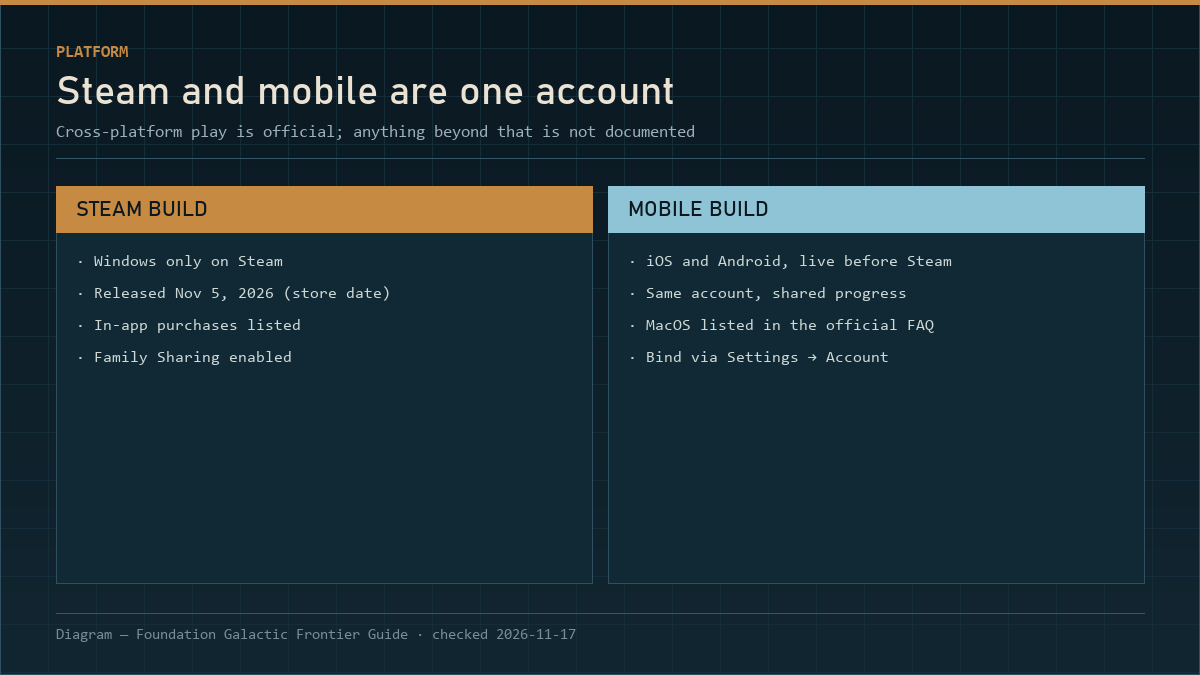
Cross-platform play and shared progression are official across Windows, iOS, Android and macOS with one account. Steam achievements are Steam-side only, the Steam build is Windows only, and server transfer is not documented anywhere.
Foundation: Galactic Frontier did not launch on Steam as a new game. The timeline lays out the thirteen months between the mobile guides and the Steam release. The mobile build was already running in October 2025 — the first three official guides are dated 2025-10-21 and one of them addresses players "returning for the Global Launch". The Steam version arrived on November 5, 2026, a year later.
That timeline explains the question everyone asks: can I play the same account on my phone and my PC? The official answer is yes, and it is more specific than most guides admit.
What the official FAQ says
Straight from FunPlus's FAQ (2026-10-09):
Foundation: Galactic Frontier supports cross-platform play and shared progression across Windows, iOS, Android, and macOS. Players can switch seamlessly between desktop and mobile devices using the same account while keeping their progress synchronized.
Four platforms, one account, one progression. The 10 Tips guide adds the operational half: bind your account via Settings → Account for security and cross-platform play, and it names PC, Android and iOS as the places you can play.
Platform matrix
| Platform | Where you get it | Cross-play | Progress shared |
|---|---|---|---|
| Windows | Steam, or the official PC client | Yes | Yes |
| iOS | App Store | Yes | Yes |
| Android | Google Play | Yes | Yes |
| macOS | Listed in the official FAQ | Yes | Yes |
| Console | Not listed anywhere official | — | — |
The Steam build is Windows only — Steam's own platform flags are windows: true, mac: false, linux: false. That does not mean the game has no macOS version; it means the macOS version is not sold on Steam. The official FAQ lists macOS, so if you want to play on a Mac, the official client is the route, not the Steam page.
What actually carries over
"Shared progression" is the official phrase. In practice, the things that are account-bound are the things you would expect:
| Carries over | Does not carry over |
|---|---|
| Base and building levels | Store purchases tied to a store account |
| Champions and their levels | Platform-specific payment methods |
| Flagship, components and Style | Local settings and graphics options |
| Guild membership and rank | — |
| Port control (guild-level) | — |
| Achievements (Steam achievements are Steam-side) | Steam achievements on mobile |
The last row is the one people trip on. Steam achievements are a Steam feature; they are not part of the game's account data. If you play on mobile, you will not earn Steam achievements, and if you start on mobile and move to Steam, your Steam achievement list starts from wherever the game's own tracking puts you.
The parts that are not documented
Three questions come up constantly, and the official material does not answer them:
- Do Steam and mobile players share the same province servers? The FAQ promises shared progression and cross-platform play; it does not describe server topology. We will not guess.
- Can you transfer a character between provinces? No official process is published. Players search for "how to change server"; the honest answer is that no documented procedure exists.
- Is there a separate "Steam launch" server set? Not stated. Your province's age is what determines the week 27 Epoch gate, and you can read your province's age in-game.
Why the Steam version matters anyway
Three differences are documented or verifiable:
- Input and screen. The Steam build runs on a desktop with a keyboard and mouse, which changes ground combat (third-person tactical) far more than fleet combat.
- Store features. Steam adds Family Sharing and Steam achievements, and lists In-App Purchases as a category.
- Languages. The Steam build lists 21 languages, every one with full audio support — a bigger list than most mobile listings advertise.
Everything else — the economy, the timers, the guild system, the ports — is the same game. If you are choosing between the two, the requirements page covers what each build needs. A Steam player and a mobile player in the same guild are doing the same activities with different ergonomics.
Practical setup advice
- Bind the account before you spend anything. Settings → Account. If you ever lose the device, binding is the difference between a recovery and a restart.
- Pick your main platform and treat the other as a companion. Claiming dailies on the phone and doing port wars on the PC is the natural split.
- Do not run two accounts "to compare". Progress is account-bound, not device-bound; a second account is a second grind, and the week 27 gate does not care about your alt.
- Check the store you bought from. Steam purchases and mobile store purchases are separate transactions even though the account is shared.
What this means for the guides on this site
Everything we write about mechanics applies to both builds: the energy counter, the Champion synergy numbers, the Home Port table, the Epoch gates. Where a difference exists — system requirements, achievements, input — we say so on the page in question.
If you are on the fence about which platform to start on, the honest answer is: whichever one you will actually open twice a day. The Epoch page is the one section where platform genuinely does not matter. The game rewards frequency more than session length, and a phone in your pocket wins that contest more often than a desktop.
Which platform for which activity
| Activity | Better on | Why |
|---|---|---|
| Claiming dailies | Phone | Two minutes, anywhere |
| Trade runs | Either | Same interface, same counter |
| Ground combat | PC | Third-person tactical benefits from mouse and keyboard |
| Port wars | PC | Chat plus a one-hour window is easier to manage on a desktop |
| Exploration sweeps | Phone | Short sessions suit it |
| Roster review | PC | Tables and comparisons are easier to read |
The pattern is not "PC is better". It is that the game's activities split into short claims and longer coordination, and the device should follow the activity rather than the other way around.
Next
- Platforms and system requirements — the Windows minimums, in a readable table.
- Is it worth playing in 2026? — the free-to-play boundary and who this fits.
- Epoch of Fusion Seed — why your province's age matters more than your platform.