
Platforms and system requirements: Windows minimums and mobile
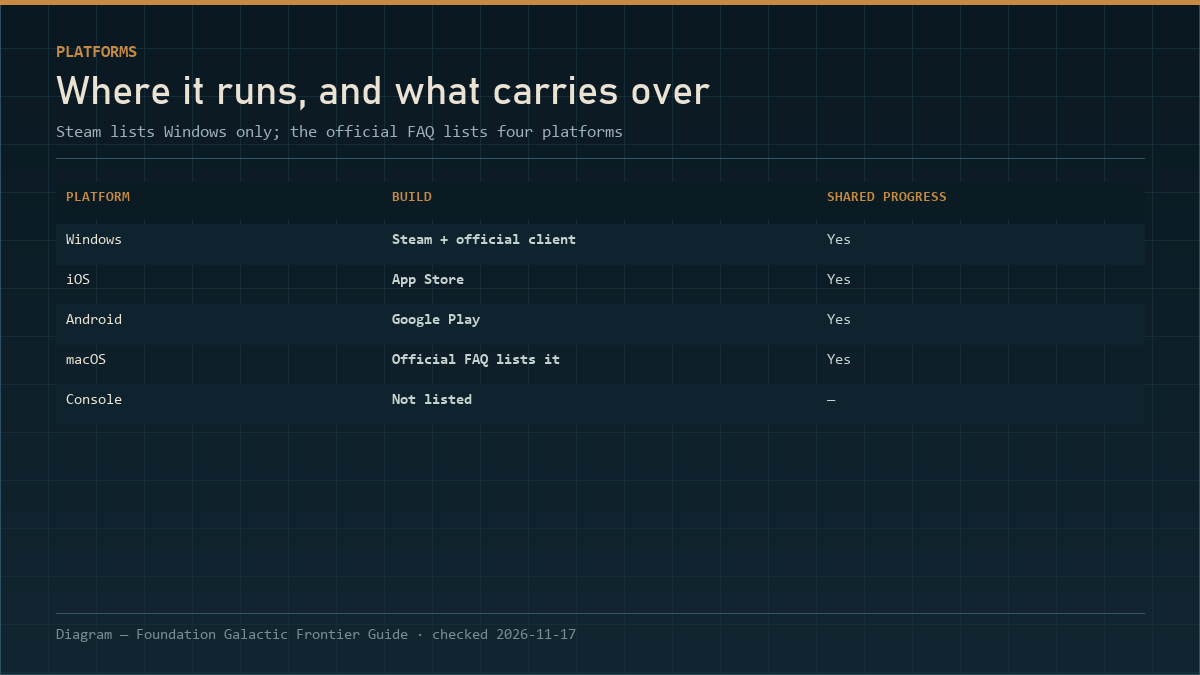
Windows minimums: 64-bit OS (Windows 7 SP1+, but Steam itself needs Windows 10+), Core 2 Duo e6400, 4 GB RAM, GTX 460 or HD 4400, DirectX 10, broadband, 8 GB storage. The Steam build is Windows only; iOS, Android and macOS run the same account.
Foundation: Galactic Frontier runs on Windows through Steam, and on iOS, Android and macOS through the official client. The Steam page publishes a minimum spec block; the official FAQ covers the platform spread. Between the two, you can answer every practical question except one: whether your particular laptop will run it well.
Windows minimum requirements
Straight from the Steam store requirements block (checked 2026-11-17):
| Component | Minimum |
|---|---|
| OS | Windows 7 SP1 or better, 64-bit required |
| Processor | Intel Core 2 Duo e6400 or AMD Athlon x64 4000+ |
| Memory | 4 GB RAM |
| Graphics | Nvidia GeForce GTX 460 or Radeon HD 4400 or better |
| DirectX | Version 10 |
| Network | Broadband internet connection |
| Storage | 8 GB available space |
| Extra | Requires a 64-bit processor and operating system |
The recommended block on the store page lists only "requires a 64-bit processor and operating system" — no CPU, GPU or RAM recommendation. That is unusual, and it means there is no official "recommended" target to compare against. If your machine clears the minimums comfortably, you are in the same information position as everyone else.
What those numbers mean in practice
- 4 GB RAM and an 8 GB install is a mobile-scale footprint. This is not a 100 GB PC epic; it will fit on a small SSD.
- GTX 460 / HD 4400 is a 2010-era GPU tier. Almost any machine from the last decade clears it, which suggests the PC build is not pushing the hardware.
- Broadband required is not a formality: this is an online MMO with cross-platform play. There is no documented offline mode.
- 8 GB is the space the store asks you to reserve. Steam does not publish a separate download size.
The full platform matrix
| Platform | Store / channel | Shared progress | Notes |
|---|---|---|---|
| Windows | Steam | Yes | Windows only on Steam; Family Sharing supported |
| Windows | Official PC client | Yes | The official site offers a PC download |
| iOS | App Store | Yes | Same account |
| Android | Google Play | Yes | Same account |
| macOS | Official client | Yes | Listed in the official FAQ, not sold on Steam |
| Console | — | — | Not listed in any official source |
Cross-platform play is a listed Steam category (Cross-Platform Multiplayer), and the FAQ confirms shared progression across all four platforms with one account. What actually carries over between devices is covered on the Steam vs mobile page.
Languages
The Steam build lists 21 languages, every one with full audio support:
English, French, Italian, German, Spanish (Spain), Spanish (Latin America), Portuguese (Portugal), Portuguese (Brazil), Russian, Polish, Dutch, Swedish, Turkish, Indonesian, Malay, Thai, Vietnamese, Simplified Chinese, Traditional Chinese, Japanese, Korean.
"Full audio" is the notable part. Most games of this size localise text and leave audio in English; this one lists audio for all 21.
Steam features you get and do not get
| Feature | Status |
|---|---|
| Steam achievements | Yes — 34 of them |
| Family Sharing | Yes |
| In-App Purchases category | Yes |
| Steam Cloud | Not listed in the store data we checked |
| Steam Workshop | No |
| Controller support flag | Not listed |
| Steam Deck compatibility | Not listed |
The absence of a Steam Deck rating and a controller flag is worth noting for handheld players: nothing official confirms either way, so treat community reports as reports, not specifications.
Mobile requirements
FunPlus does not publish a device compatibility list on the pages we can verify, and the store listings vary by region. The practical test is the store page on your own device: if the App Store or Google Play lets you install it, the device is supported.
What we can say: the mobile build has been live since 2025, the install is in the same 8 GB class as the PC build, and the game requires a persistent connection. For what to do on first launch, use the beginner route.
A pre-install checklist
- Check the OS is 64-bit. The game will not run on a 32-bit install.
- Free 8 GB. The install is not huge, but a full drive causes patch failures.
- Confirm Windows 10+ if you are using Steam, regardless of the listed minimum.
- Bind your account (Settings → Account) before you invest time — this is the step that makes cross-platform play safe.
- Decide your main platform. Phone for dailies, PC for port wars is the common split. If you are still deciding whether to install at all, the fit test is a faster read than the spec table.
What the specs do not tell you
The minimum block says nothing about how the game behaves on a machine that just clears it. Three things matter more than the GPU tier:
- Connection stability beats bandwidth. This is an online MMO with cross-platform play. A stable 10 Mbps line plays better than a flaky 200 Mbps one.
- The mobile build is thermally limited, not spec-limited. Long sessions on a phone throttle; short sessions do not. That matches the game's session design, which is another argument for the two-sessions-a-day habit.
- The 8 GB install grows. Live games add assets. Plan for more than the listed number if your drive is tight.
Moving between devices: a migration checklist
- Bind the account first (Settings → Account) on the device you already play on.
- Install on the second device and log in with the same account, not a guest profile.
- Check three things: base level, Champion roster, guild membership. If any of them differ, you are on a different account.
- Do not create a new character "to test" — a second profile is a second grind, and it will not share progress.
- Keep the store separate: a Steam purchase and an App Store purchase are different transactions even on one account.
Cross-play is not cross-buy
One account across four platforms means one progression, not one wallet. A purchase made through Steam stays a Steam transaction; a purchase made through the App Store stays an Apple transaction. If you switch devices, your Champions and buildings come with you, but your receipts do not. Keep that in mind before buying anything you might want to dispute later.
Next
- Steam vs mobile: what carries over — the account model in detail.
- Is it worth playing? — the fit test before you install.
- Beginner guide: the first 60 minutes — what to do the moment it finishes installing.